




POS That Boosts Customer Experience

Runs on any platforms any devices
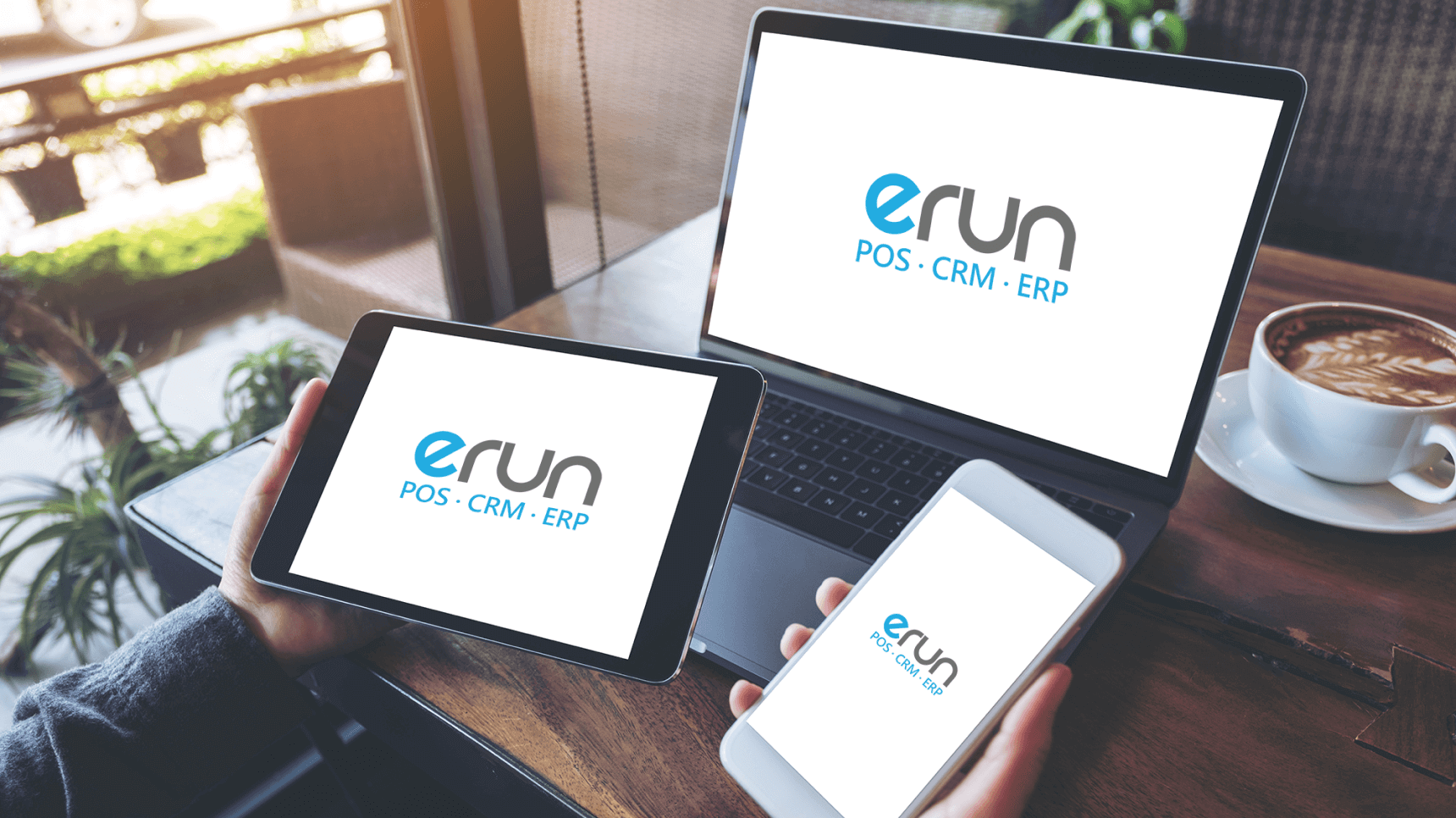
No longer limited to a single piece of hardware! eRun Retail POS supports Windows, iOS, and Android platforms. Whether using a desktop terminal, tablet, or smartphone, you can flexibly deploy hardware as needed. A unified interface greatly reduces training costs and solves the pain points of high staff turnover and lengthy training. Employees can seamlessly switch between devices without relearning, ensuring front-end service continuity even when roles are temporarily reassigned.
Support both cloud and on-premise POS
Choose cloud, on-premise, or hybrid deployment based on your budget and operational needs. Our professional technical team ensures fast installation, secure maintenance, and future scalability, so you don’t have to worry about the technical risks of system migration.
Cloud solutions are ideal for multi-store chains and remote management, while on-premise solutions keep checkout running even during internet outages. Hybrid deployment combines the best of both, balancing stability and flexibility to meet the growth needs of businesses of all sizes.
Diverse front-end sales features
Support order suspension, retrieval, and cancellation, with full handling of pre-orders and deliveries. During checkout, instantly check product prices, images, and stock levels – solving the pain point of opaque inventory. One tap on member info displays the member’s photo, discounts, and purchase history, helping staff make personalized recommendations that increase average transaction value and satisfaction.
The front end can also handle complex scenarios like full pre-orders, partial pickup, and cross-store delivery, letting customers complete all requests at one checkout point and reducing back-and-forth communication.
Integrated ePayment | Faster checkout
Seamlessly connect to Global Payments, TradeLink, EFT Pay, Octopus, Qianfang, Shouqianba, Bank of China, Hang Seng Bank, and more. Support Visa, MasterCard, Alipay, WeChat Pay, Octopus, Apple Pay, Android Pay, FPS, and Payme.
One integration means no more multiple card readers or switching between apps – solving the pain points of fragmented payment methods and long checkout lines, thereby optimizing the customer experience.
Integrated Payment Gateways







20 e-Payment Methods

















Self-service Kiosk | 24/7 operation, save labor
The cloud backend synchronously manages products, inventory, members, and orders for both POS and Kiosk. High‑accuracy scanning, integrated multiple payments, and automatic receipt printing let customers complete purchases self‑service, reducing queues and miscommunication. With a sleek, minimalist design, the Kiosk fits any environment, effectively driving traffic while reducing costs and increasing efficiency.
Kiosks can be placed outside stores or used during off‑peak hours to enable 24/7 unattended sales – ideal for fast food, ticketing, convenience stores, etc., greatly extending business hours without adding labor costs.
Customizable receipts
Run Retail POS supports many receipt types: thermal paper, dot‑matrix printer paper, A5, A4, multi‑copy, temporary receipts, and electronic receipts. You can customize receipt formats based on industry needs – adding logos, promotional messages, member point details, refund policies, and more.
Whether you are in traditional retail, food & beverage, services, or need to comply with environmental regulations, you’ll find a receipt solution that fits. Electronic receipts can be automatically sent to customers’ mobile phones, easy to save and query for after‑sales service, while reducing paper costs.
Automated Modules for Fast Scaling
Auto Member Rewards | Faster Front-End
Scan the member QR Code, and the system automatically handles discounts, points accumulation, stored value, gift redemption, birthday rewards, and even service package deductions. All reward details are printed on the receipt, eliminating manual errors and making members feel truly cared for. Front-end staff no longer need to memorize complex rules or calculate manually – they can focus entirely on sales and customer interaction.
The system can also automatically send reward notifications, such as birthday offers or points expiring soon, further increasing member loyalty. Whether in physical stores or online shops, members enjoy identical benefits, ensuring a consistent brand service standard.
Promotion Engine | 300+ Auto Rules
Customize 14 rule types – including multi-buy discounts, category‑specific offers, member promotions, tiered spending, and more – to create over 300 unique promotion rules. At checkout, the system automatically checks if the transaction qualifies for any offer and clearly displays the results on the receipt, solving the pain points of messy promotion execution and high staff training costs.
You can set exclusive offers for different stores, time slots, or membership tiers, and enable or disable them anytime. The system automatically calculates the discount combination that best benefits the customer, without any manual intervention – speeding up checkout while avoiding customer disputes.
High Scalability | 1 to N Stores
When the number of stores increases, or when you expand into cross‑brand operations or new regions, the system architecture scales without friction. The central backend allows monitoring and management by geographic area or brand, with no need to replace the system or re‑implement. You can view sales, inventory, and member data for all stores from a single backend, and set promotions and permissions uniformly.
Adding a new store is as simple as duplicating an existing configuration, dramatically shortening store opening preparation time. Even if your business pivots or makes acquisitions in the future, eRun adapts flexibly, protecting your long‑term IT investment.
Strict Access & Logs
Set permissions for POS operations, report viewing, inventory costs, etc., based on job roles – ensuring oversight without hindering work efficiency. For example, cashiers can only process transactions, store managers can view sales reports, and executives can access cost and gross profit analysis.
Every operation is tracked in activity logs, including who changed prices, processed returns, or adjusted stock levels and when – making audits and issue tracing easy. This mechanism not only prevents internal errors or fraud but also meets the internal control requirements of public companies and chain brands, giving management peace of mind.
Digital Backend | Real-Time Mobile Inventory
Real-Time Backend Workflow
All transactions, material allocation, and inventory are updated synchronously, solving the pain points of stockouts or overstock caused by data delays. The backend interface is designed to match user habits, making it easy to handle tens of thousands of transactions – suitable for complex retail formats such as chain cosmetics stores or bakeries.
The system automatically updates inventory status at every stage of order creation – for example, reserving planned stock as soon as a purchase order is confirmed to prevent overselling. It also supports inter‑warehouse transfers and stock movements. Headquarters can view the inventory levels of each store in real time and receive automatic purchase suggestions based on actual sales, making the supply chain faster and more accurate.

Cloud Backend | Mobile Remote
Whether adding or deleting staff, members, products, or handling purchases, stock transfers, returns, and replenishment – everything can be done from any mobile device as long as there is an internet connection. Store staff can submit replenishment requests instantly, and after management approval, the warehouse dispatches goods, ensuring uninterrupted supply. Managers on the go can also review purchase orders, check real‑time sales reports, or adjust promotion settings from their phones.
The system supports multi‑level approval workflows – for example, a replenishment order exceeding a certain amount requires regional manager approval, preventing unclear responsibility. The cloud backend frees business decisions from the office, greatly enhancing operational flexibility.
Omnichannel Inventory
Receiving, sales, transfers, and current stock are all visible across physical stores, online shops, department store counters, exhibitions, pop‑up stores, and consignment points. The automatic replenishment function creates restocking orders based on sales volume or preset minimum stock levels, preventing both stockouts and overstock. You can set different safety stock days for different sales points – for instance, higher inventory levels for busy stores, and just‑in‑time replenishment for pop‑ups.
The system also forecasts future inventory needs based on historical sales trends and proactively suggests reorder timing. Unified management of inventory across all sales points effectively reduces capital tie‑up while improving order fulfillment rates.
Mobile Stocktaking | Wireless
After stocktaking with a mobile phone, inventory counts are instantly transmitted to the backend, generating real‑time reports. Additional methods such as in‑store partial counts, Excel import/export, and barcode readers are also supported. Discrepancies are clearly displayed, greatly reducing stocktaking pressure. Employees can use phones or tablets to count – free from power or network cables – and can even scan while walking through high warehouse shelves.
The system automatically compares system stock with actual counts, highlighting items with large differences for re‑checking. Data can be uploaded immediately after counting, without returning to the office for manual entry, avoiding duplication or human error, and shortening monthly stocktaking time by over 50%.
Batch Management | Expiry Tracking
Supports the FIFO (First‑In, First‑Out) principle, automatically alerting on soon‑to‑expire items to avoid losses from expiration. Quality traceability quickly locks down affected inventory, improving supply chain transparency – ideal for fresh food retail, pharmacy chains, etc. The system records each batch’s inbound date, expiry date, and supplier information, and prioritizes the earliest batch when shipping.
In the event of a product recall, simply entering the batch number shows which members bought that batch or which stores received it, enabling rapid response. Batch management also helps promotion staff actively push near‑expiry products, reducing waste and write‑offs.
Auto Unit Conversion | Prevent Errors
Conversions for the same product with multiple units, or for packing/unpacking, are handled automatically. The POS connects digitally with smart scales: when cutting fresh meat or seafood on site, the weight is instantly converted and inventory deducted, solving measurement pain points in fresh retail. For example, a case of drinks can be sold as individual cans – the system automatically converts inventory quantity and cost. When frozen meat is cut from a whole piece into smaller portions, the system simultaneously reduces the whole‑piece stock and increases the portion‑size stock according to preset conversion rates.
The smart scale integration means staff only need to place the product on the scale – the POS automatically reads the weight, calculates the price, and deducts the corresponding weight from inventory, eliminating manual conversion and entry errors.
Cost & Stock | Accurate Asset Value
Provides two calculation methods – FIFO and average cost – plus market‑value estimation. Helps with financial reporting and more accurate business decisions. FIFO is suitable for products with high price volatility (e.g., fresh goods, electronics) as it reflects actual usage cost; average cost works well for everyday items with stable prices, simplifying accounting.
The system automatically generates cost analysis reports showing gross profit, weighted average cost, and inventory value for each product. When stock adjustments or purchase price changes occur, the system immediately recalculates total inventory value, ensuring balance sheet accuracy and giving managers a clear view of true profit.
API Integration | Empowering Multi-Channel Sales
eRun provides professional, customizable API solutions that help retail businesses seamlessly connect their online stores and integrate data from various sales channels – including physical stores, mobile sales, department store counters, exhibition venues, pop-up shops, and consignment points. This enables unified backend management for multi-channel marketing, optimizing the customer shopping experience while enhancing brand loyalty.
Three Key Benefits of eRun’s Multi-Channel Integration :
- The POS system automatically aggregates orders from all sales points into a central backend, giving you a complete view of overall business performance and KPIs.
- Sales status and inventory levels for all products across different channels are synchronized in real time, making it easy to manage pricing flexibly and consistently.
- The system consolidates and analyzes customer shopping habits and behaviors across all channels, helping you launch proactive, targeted marketing strategies.
Reward Loyal Customers | Drive More Sales
Member System Integrated Across All Sales Points

Members enjoy the same discounts, points, and stored value balances at any sales point (physical stores, online shops, pop‑up stores, etc.), with real‑time data synchronization – no duplicate entry required. For example, points earned in the online store can be directly redeemed at a physical store checkout; value stored at branch A can be used at branch B. The system automatically records every cross‑store transaction, ensuring no member benefit is missed. This integration not only improves the member experience but also reduces the burden on front‑end staff for manual lookups and adjustments, giving brands greater confidence in fulfilling their service promises.
Cross‑Brand & Cross‑Sector Member Promotions
If you operate both restaurants and retail stores, members can earn points and redeem offers at any location, leveraging the powerful cross‑sector promotion effect. For instance, points earned at a restaurant can be used for discounts at a retail store, or membership tier accrued at a clothing store can unlock upgraded benefits at a café under the same group.
The system identifies member identities across different brands, automatically consolidates purchase histories, and calculates total rewards. This model drives customer traffic across different business sectors, increases overall revenue, and enhances member loyalty to the group.
Rapid Member Acquisition via QR Code Scanning
Guide consumers to register as members before online shopping, or invite them to scan a QR code in‑store to join instantly – simplifying the recruitment process and significantly boosting conversion rates. Upon joining, customers immediately enjoy first‑purchase discounts or point‑earning benefits, increasing the likelihood of an immediate sale. Stores can also place dedicated QR code stands for self‑registration, saving staff time and converting more foot traffic into traceable member assets.
Service Packages | Pre‑sell Products to Lock in Revenue
Support pre‑sale plans such as “buy 10 get 1 free” or package discounts. Members can purchase multiple services or products at once and use them at any branch. The system instantly deducts used counts and synchronizes remaining balances across the backend and all stores, preventing over‑redemption. For example, with beauty SPA packages, parking vouchers, or course tickets, members simply show their QR code – staff scan it, see the remaining usage, and complete the deduction.
Packages not only lock in revenue in advance but also increase customer return visits, while simplifying in‑store redemption processes and eliminating the risk of lost or forged paper tickets.
Mobile Member App | Boosts Interaction and Trust
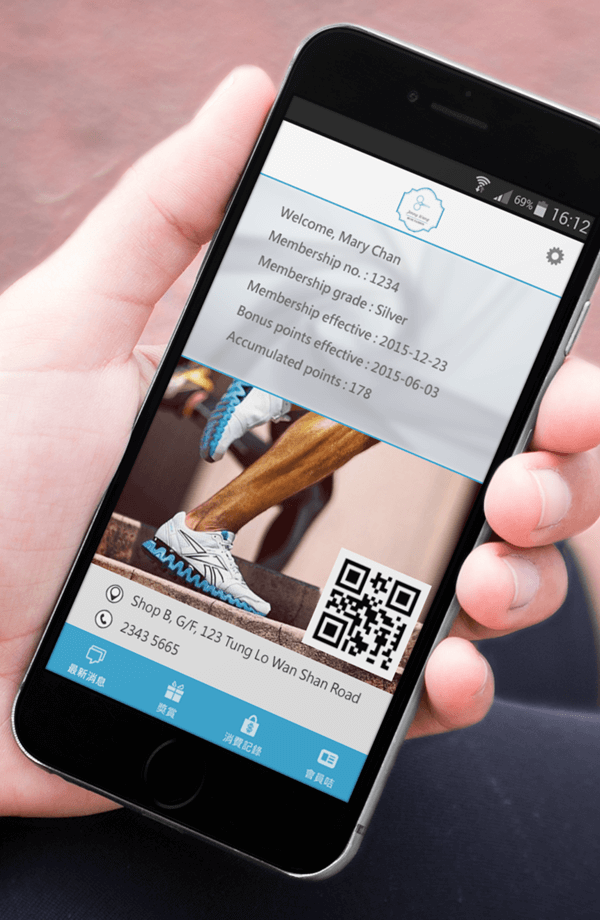
Members can use the dedicated app to check accumulated points, vouchers, package balances, and transaction history at any time, as well as receive push notifications on the latest products and promotions. The app includes features such as nearby store search, online booking, and in‑store pickup, offering a one‑stop service experience.
The system delivers personalized offers based on members’ purchase preferences – for example, birthday gifts or win‑back coupons for inactive customers. This transparent, real‑time interaction builds member goodwill and trust, encouraging them to actively open the app and participate in activities, creating a positive feedback loop.
Digital Vouchers | Flexible Issuance, Electronic Redemption
Supports pure cash vouchers, promotion‑rule‑based vouchers, point‑exchange vouchers, etc., with serial number management, store‑wide or product‑specific applicability, and expiry dates. Customers simply show a QR code – staff scan it, and the system automatically validates the voucher and applies the discount.
Digital vouchers are distributed via the app, saving printing and delivery costs while avoiding disputes over lost physical vouchers. Businesses can issue exclusive offers to different customer segments – for example, welcome gifts for new customers, VIP birthday vouchers, or clearance bonus coupons. All issuance and redemption records are traceable, making it easy to evaluate campaign effectiveness and adjust strategies.
Customer Data Analytics | Precision Marketing
Access visual reports anytime, anywhere, to analyze key metrics such as purchase frequency, top‑spending customers, and voucher usage. The system automatically calculates member retention rate, average transaction value, point redemption rate, etc., helping you measure whether loyalty activities achieve expected results.
With multi‑dimensional filtering (e.g., by region, age, spending range), you can identify behavioral patterns of high‑value customer groups and then plan precision marketing strategies – for instance, sending win‑back offers to inactive members or recommending new products to those who frequently buy specific categories – maximizing the return on your marketing budget.
Create Promotions | Reward Customers While Boosting Sales
Common retail promotion pain points: complex rules, hard for staff to remember, manual checkout errors, messy discount stacking, and difficult campaign tracking. eRun’s smart promotion engine comes with 300+ built‑in promotion rules – from clearing inventory and driving sales to launching new products and encouraging cross‑selling. The system automatically calculates discounts, making it easy for you to drive business growth.
Different Promotion Rule Types | Drive Customer
Spending We provide 14 promotion rule types that can be combined with various conditions and offers to create over 300 rules. Whether you are in retail, food & beverage, or services, you can find the right promotion strategy and build a tailored marketing plan.
14 types of promotion rules:














Diverse Offer Conditions | Flexible Control of Markdown Promotions
The promotion engine supports setting priority order, validity dates, usage limits, and whether rules can be stacked or must be used alone. For example, you can set “member exclusive discount overrides store‑wide promotion” or limit “one use per customer per day”.
You can enable, pause, or delete rules at any time – the entire promotion transaction is fully automated, making it easy to adjust marketing plans for peak and off‑peak seasons. The system automatically handles complex offer logic, avoiding manual setup errors or campaign conflicts such as the order of “discount first, then spend‑and‑get”. This lets marketing teams focus on strategy planning rather than checking every transaction.
User‑Friendly Interface | Front‑Line Staff Promote Without Extensive Training
The promotion engine offers an intuitive interface to preset rules and even run test simulations – for example, showing discount results for different product combinations. At POS checkout, the engine automatically determines whether a transaction qualifies for an offer and prints discounts, promotional prices, or free gifts clearly on the receipt. Staff do not need to memorize complex rules – they simply focus on serving customers.
In addition, each discount name and amount saved is clearly listed on the receipt, so customers understand everything at a glance, reducing complaints and misunderstandings. This dramatically lowers training costs for new hires, improves checkout efficiency, and increases customer satisfaction.
Cloud Reports | Empowering Efficient Decision-Making
Multi-Dimensional Data Analysis Tool
The system enables cross‑dimensional analysis of sales, inventory, costs, member activity, and staff performance by time, region, personnel, warehouse, store, product category, or individual SKU. For example, you can query “last month’s sales quantity, color preference, and member age distribution for a newly launched T‑shirt across all stores in Hong Kong Island” or “the inventory turnover rate of Warehouse B over the past week”.
Thanks to proprietary technology, large volumes of data can be processed quickly on low‑cost hardware – no need to invest in expensive servers. This gives small and medium‑sized businesses access to enterprise‑grade analytics, turning data into actionable insights to pinpoint high‑profit products or underperforming stores.

Real‑Time Cloud Reports
Access key reports – such as hourly sales data, monthly sales statistics, gross profit analysis, and cost control – anytime, from any device (mobile, tablet, or computer). The visual dashboard shows real‑time performance for the entire company and individual stores, automatically comparing results against annual and monthly targets, so you can instantly spot if progress is falling behind.
The system also provides trend charts for the past 7 days, 6 months, and 3 years, as well as year‑over‑year comparisons for the same month over three years. You can export reports to Excel for further analysis, and set permission levels to ensure employees only see what is authorized. The “Favorites” feature gives one‑click access to frequently used reports, dramatically improving decision‑making efficiency.


